Better Communication Starts with Sharing
STEP 1: Start or Resume Your Journey:
| Access the Herrmann Platform by logging into: https://journey.herrmannsolutions.net/thinker Through the ‘My Journey’ tile you will learn more about the Whole Brain® Model and your HBDI® results prior to unlocking the ability to share. Once you unlock your HBDI® results and sharing, you will complete a series of self-reflection activities that will build your shared profile. The more time and effort you put into these activities the greater the value sharing will have for everyone. |
STEP 2: Grant Permission
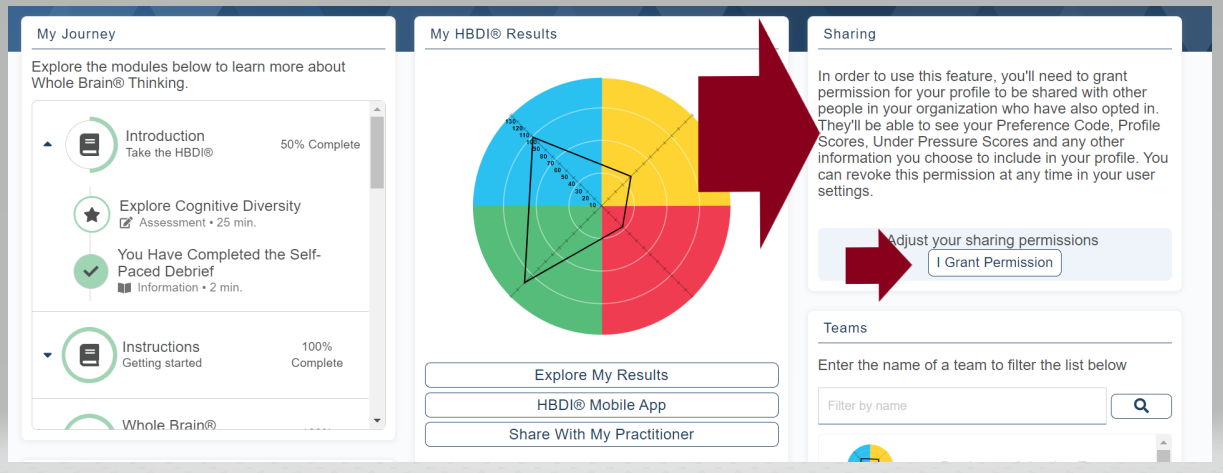
| Now that you’ve taken the time to reflect on your preferences and what they mean to you… share that information with your colleagues. Granting permission can be done from the ‘My Journey’ activities or the ‘Sharing’ tile. Granting permission is also how you gain access to the self-reflection of others. Search for colleagues or get your profile’s unique URL and make it available to co-workers to start improving communication. |
STEP 3: Share & Compare
| Your self-reflection provides co-workers a cheat sheet on how to communicate with you – what they should know, what they should include, and what they should avoid. Before you build that next presentation, draft that next email, or schedule that next meeting – take a few minutes to lookup the shared profiles of your audience. Making this a habit will ensure your communications are effective and well received, improving the quality of your everyday interactions. |
Herrmann Global 2020 https://www.thinkherrmann.com/
0
0
Was this article helpful?
0 out of 0 found this helpful
Add comment
Please sign in to leave a comment.